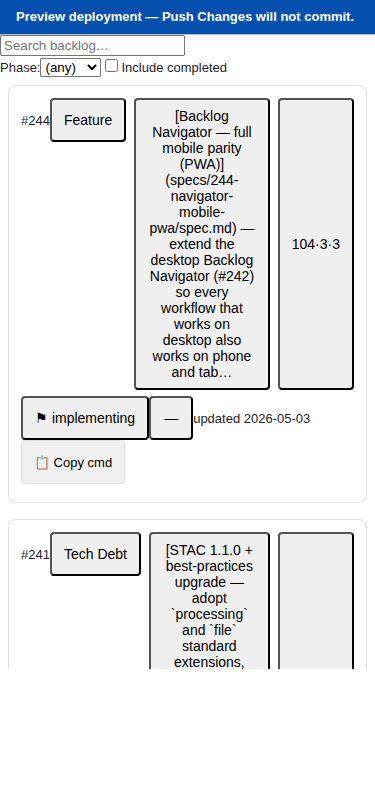
| Before (#242 desktop only) | After (#244 mobile parity) |
|---|---|
| 12-column table, unusable below ~900px | Virtualised card list at 375×812 |
| Inline cell editors that need a mouse | Tap-to-edit bottom sheets with thumb-reach controls |
| Top-bar Push button lost behind horizontal scroll on phones | Sticky bottom Push-Changes bar, always visible |
| Browser tab only — no install, no offline shell | Installable PWA, offline app shell, “update available” banner |
What We Built
The Backlog Navigator now works on a phone. The same app a reviewer uses on a desktop during planning sessions also opens on an iPhone during a stand-up and on an iPad over coffee — without losing a single workflow. Below 1024px we swap the 12-column table for a virtualised card list, replace inline cell editors with tap-to-edit bottom sheets, push long-form Description edits into a full-screen Markdown editor, and pin the Push Changes action to a sticky bottom bar where a thumb expects it.
There is one codebase, one Vite build, one parser, one state model, one GitHub push pipeline. The mobile and desktop layouts diverge once — at the top of App.tsx, behind a useIsMobile(1023) hook from @debrief/components/hooks/useIsMobile — and converge again on the same BACKLOG.md output. Story 1 and Story 2 from #242 now pass at 375×812, 768×1024, and 1024×768. The PWA gate runs in CI on every PR. Install it on a home screen and it launches like a native app.
How It Fits
This is the second half of #242 (Backlog Navigator). #242 proved the pattern — parse BACKLOG.md, edit in-app, push back to GitHub via the REST API, reconcile in the browser. #244 extends that pattern to every device an analyst already carries, without forking the codebase. It sits inside apps/backlog-navigator/: no sibling app, no new top-level package. The parser, state reducer, and push pipeline under src/ are byte-for-byte unchanged. The new code lives in src/components/mobile/, src/editors/, and src/pwa/. It mirrors the responsive-app philosophy already in place for the Spec Navigator (#191).
Key Decisions
- Single responsive app, not a sibling mobile codebase. A sibling app would have split the parser, state model, and push pipeline across two repos and doubled the test surface. We branch once on
matchMedia('(max-width: 1023px)')and share everything below the branch. - PWA via
vite-plugin-pwa(Workbox). First-class Vite tooling, generates the manifest, registers the service worker, and exposesvirtual:pwa-registerfor an explicit “update available” banner — no silent reloads. Recorded as ADR-030. - Two-zone cache: shell precached, GitHub fetches network-only. Stale backlog data would be a trap, so we never cache it. Offline means the shell renders with a clear “Backlog data unavailable” empty state — honest about what works and what doesn’t.
- Hand-rolled bottom-sheet gesture (~110 lines of Pointer Events + transform). Per Article IX we only reach for
vaulif the hand-roll proves brittle. It hasn’t. - Virtualised card list via
@tanstack/react-virtual— already in the monorepo from #094, so zero new dependency cost. - Lift editor state above the layout-mode branch. A late
/speckit.reviewoutcome (Issue 1A): when iPad rotation crosses the 1024px breakpoint, the mobile component subtree unmounts. To prevent silently destroying a dirty edit, we lifted bottom-sheet and description-editor state into an App-root<EditorOverlayProvider>and surface the FR-009 discard-confirm dialog when the mode flips. Article I.3 (“no silent failures”) would not survive the alternative.
Screenshots — the analyst flow on a phone
Bottom sheet — tap a chip to edit
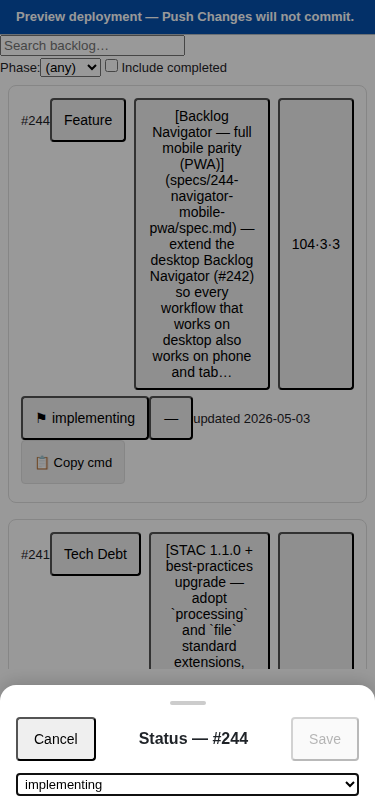
The same editor controls that live in the desktop inline editors run inside the sheet. Drag down past 80px to dismiss; tap outside; or use the explicit Cancel button. Save commits via the same PendingEdit shape desktop uses — proven byte-identical by the round-trip parity tests.
Full-screen Markdown editor
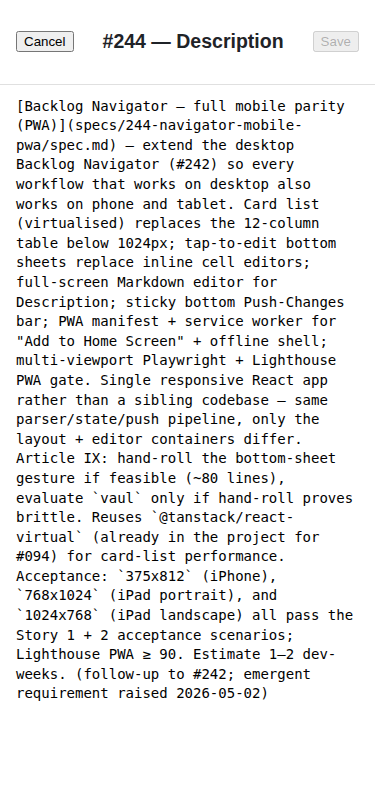
Monospace textarea so the raw Markdown structure is obvious. Embedded links, escaped pipes (\|), and tables all round-trip cleanly through the parser.
Discard-confirm dialog
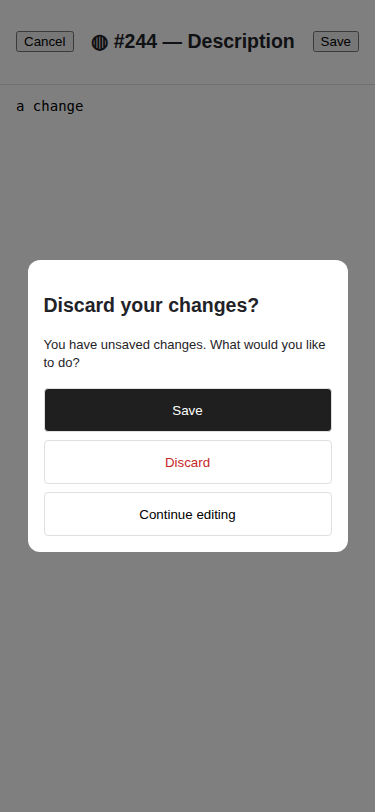
The same dialog fires from three places: cancel-with-dirty in the bottom sheet, cancel-with-dirty in the description editor, and the cross-breakpoint rotation handler. Three explicit buttons (Save / Discard / Continue editing) — no implicit dismiss.
Sticky push bar
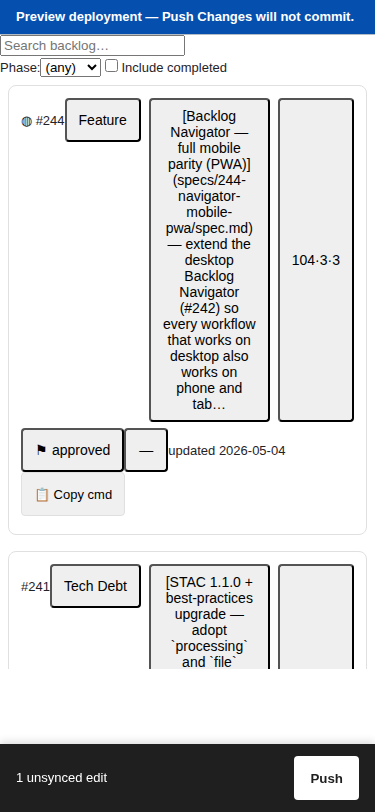
Hidden when there’s nothing to push (FR-010). When edits are pending, the bar sits above the iPhone home bar via env(safe-area-inset-bottom). Tap Push to open the same PushDialog desktop uses; conflict detection (HTTP 409) is identical.
Offline empty state

Installed and launched without network: the app shell loads, the empty state is honest, no white screen, no console errors.
Emergent: copy-speckit-command chip
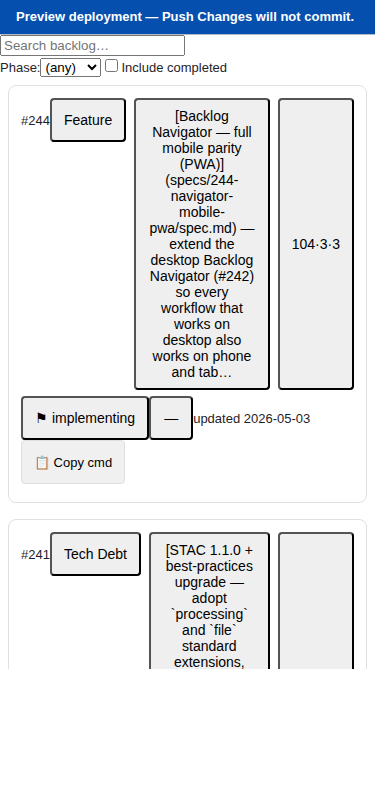
A mid-implementation request: “from a phone I want to fast-task Claude on a backlog item without typing the spec ID.” Each card now has a status-sensitive chip that copies a slash command:
| Status | Copies |
|---|---|
proposed, needs-interview |
/speckit.start <id> |
approved |
/speckit.specify <id> |
specified |
/speckit.clarify <id> |
clarified |
/speckit.plan <id> |
planned |
/speckit.review <id> |
tasked, implementing, blocked |
/speckit.implement <id> |
Tap → “Copied” flash → paste into Claude Code. Saves three taps per task hand-off.
By the Numbers
| Metric | Value |
|---|---|
| Vitest tests passing (47 new for mobile components) | 121 / 121 |
| Playwright mobile tests passing across three viewports | 30 / 30 |
| Desktop Playwright tests still passing (FR-023 / SC-008 parity gate) | 12 / 12 |
| Round-trip byte-parity tests (bottom sheet + description editor) | 5 + 4 |
| Gzipped JS payload growth (target +15%, cap +30%) | +10.96% |
| Gzipped JS bundle size (was 121,576) | 134,979 B |
| Phases in the implementation plan, with hard human-approval gate at 2.5 | 8 |
Lessons Learned
- The mockup-review gate paid for itself. Seven ASCII wireframes surfaced about six reviewer-facing decisions (one-card vs two-column tablet layout, unified vs per-axis score editor, etc.). Having the choices in writing meant Phase 3+ never burned cycles re-litigating layout.
- React 18 batched setState updaters can fool you. A first-pass
requestCloseBottomSheettried to read state inside asetBottomSheet(prev => ...)updater AND check a closure variable for the next setter call. React 18 batched the updater, so the closure variable was always false when checked. Fix: read state directly, not from inside the setter. Two of the EditorOverlayProvider tests caught this within minutes. - Issue 1A (cross-mode rotation) is real. We initially scoped the discard-confirm dialog to the cancel button only. The review pass surfaced the iPad-portrait → landscape case, where the entire mobile subtree unmounts and silently destroys an open editor. Lifting state above the layout-mode branch added 60 LoC and one regression E2E. Worth every line.
- The emergent copy-cmd chip cost ~120 LoC + 11 tests and is probably the most-used part of this feature within a week.
What’s Next
Three follow-ups for the v1.x cycle:
- Real-device manual smoke — three Playwright-untestable items (≥50fps scroll, iOS soft-keyboard occlusion, update-prompt latency) gated by manual smoke. The protocol lives in
evidence/manual-test-log.md; append a row per device. - Copy-cmd chip on desktop — the same productivity win applies on the desktop ItemRow. Out of scope for #244 (the user explicitly asked for “the detail card”); a small follow-up if there’s appetite.
- Lighthouse first-run results — the CI gate runs on the first PR; the PWA score is captured as a CI artefact and linked into
evidence/lighthouse-pwa.htmlpost-merge.
The headline: a single deployed Backlog Navigator that the same analyst uses comfortably on phone, tablet, and laptop. One codebase. One bundle. One push pipeline. One source of truth for BACKLOG.md.