What We Built
The Log panel is the analyst’s audit trail — every operation applied to track data, in order, with the parameters that were used. Three weeks ago it rendered raw PROV records: tool names, positional indices, ISO 8601 durations. Accurate, but slow to scan, and quietly misleading in one specific way. This PR closes the remaining 15% of the redesign and fixes that quiet problem.
The change analysts will notice first is that every parameter value now
shows. Previously the panel only rendered parameters that had been
changed from their defaults — the idea being to reduce visual noise. In
practice, a parameter set like {speed: 30 (non-default), units: metres
(default)} collapsed to a single chip, and “units: metres” became
invisible. An analyst reading the log couldn’t tell whether the value was
defaulted or simply missing from the record. Now every parameter renders
as a chip, up to a cap of five with a +N more overflow indicator, and
parameters that departed from defaults carry a small red-dot marker.
Default and non-default are both present; the difference is visible;
nothing is hidden.
The second change analysts will notice is that timestamps are now
UTC, formatted as HH:MM:SS UTC regardless of the viewer’s timezone.
Audit logs compared across labs — Portsmouth, Halifax, Canberra — now
mean the same clock. Durations ≥1s render with a single decimal (1.0s,
2.3s, 30.0s) so you can scan a column of runtimes without the visual
jitter of mixed 1s / 2.3s formatting; sub-second values stay as
Xms.
Screenshots
The default Timeline view: five cards, each with a tool-category icon, a step number, track badges, a UTC timestamp, a formatted duration, and a row of parameter chips. Red-dot markers flag values that departed from their defaults.
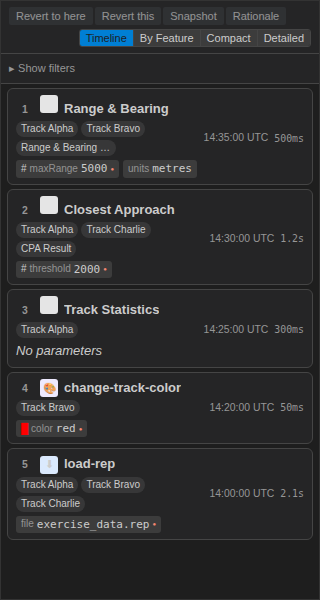 Timeline view with mixed parameter types and a “No parameters” row on Track Statistics.
One card per tool-category icon so the full icon vocabulary is visible at a glance — import, style, calc, filter, snapshot, and the neutral grey fallback for unknown tools.
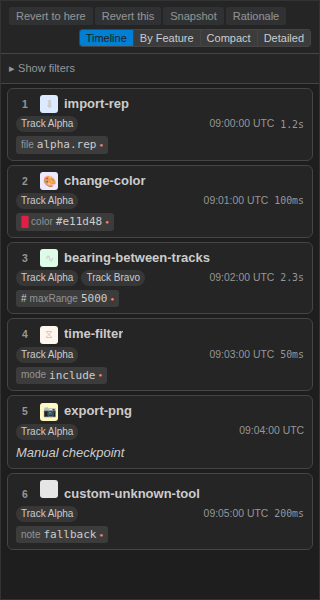 All five category icons plus the neutral-grey fallback for unregistered tools.
Edge cases in one frame: a snapshot entry rendered as Manual
checkpoint with no duration, an operation with no parameters shown as
muted italic text, and a three-track badge row wrapping to a second
line.
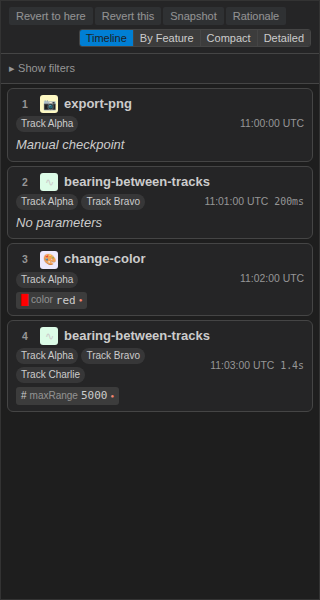
Manual checkpoint, No parameters, colour-swatch chip, and multi-track badge wrap.
A disabled entry renders at reduced opacity with a red-tinted Disabled
badge, but remains fully interactive — parameter chips still show,
selection still works.
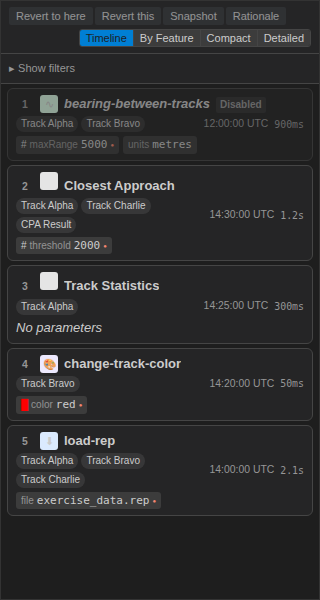 Disabled card — reduced opacity, explicit badge, parameters preserved.
Before and After
| Before | After | |
|---|---|---|
| Parameters rendered | Non-default only | All, capped at 5 + +N more |
| Default vs. missing | Indistinguishable | Default renders as chip; non-default carries red-dot marker |
| Empty params | Empty row | No parameters placeholder (muted italic) |
| Snapshot entries | Showed a tool runtime that didn’t exist | Manual checkpoint placeholder, duration hidden |
| Timestamp format | Local time, varied by machine | HH:MM:SS UTC, stable across labs |
| Duration ≥1s | Mixed (1s, 2.3s) |
Single decimal (1.0s, 2.3s, 30.0s) |
| Tab navigation | Mouse only | ARIA tablist with ArrowLeft/Right/Home/End |
| Non-default flag | isDefault double-negative |
isNonDefault — true means “show the dot” |
The polarity flip
One of the smaller commits in this PR was also one of the more
satisfying. The contract carried a boolean called isDefault, and the
component needed the red-dot marker when that flag was false. Every
call site read as “show the dot when !isDefault”, which is the kind of
double-negative that forces a pause every time you read it. Flipping the
flag to isNonDefault — across the types, the component, the tests, the
spec contract, and the i18n key — removes the negation. The dot renders
when the flag is true. The tests read in plain English. The future
reader doesn’t have to decode anything.
This is a tiny change with no user-visible effect, but it’s the kind of
change that’s only cheap to make once. Left in place, isDefault would
have leaked into every new call site for as long as the component
existed.
Accessibility
The 4-tab view-mode bar (Timeline, By Feature, Compact, Detailed) now
uses a proper ARIA tablist with roving tabIndex. ArrowLeft and
ArrowRight cycle through adjacent tabs with wrap; Home and End
jump to the first or last. Only the active tab has tabIndex={0}, so
tabbing out of the panel goes to the next focusable element rather than
cycling through each tab. Each card carries aria-selected reflecting
selection state and a step-numbered aria-label so a screen reader
announces “Step 3, bearing-between-tracks, 09:02:00 UTC” rather than an
unlabelled region.
The @axe-core/playwright audit across all stories in all themes is
tracked as a follow-up under #209 — it’s a separate concern from getting
the semantics right, which this PR does.
Storybook
Four focused stories land with this PR:
- AllCategories — one card per tool-category icon (import, style, calc, filter, snapshot, and the neutral-grey fallback).
- AllChipTypes — one parameter chip per inferred type (colour, number, boolean, range, enum) so the type-inference chain is visible at a glance.
- EdgeCases — the
No parametersplaceholder, theManual checkpointplaceholder on a snapshot entry, a deleted-track badge, and a+N moreoverflow indicator all in one view. - DisabledCard — a card rendered at reduced opacity with its disabled badge.
These run on the same CI path as the rest of the component library, and they’re the stories the Playwright component E2E drives when it captures theme-variant screenshots.
By the Numbers
| LogPanel component + unit tests | 70 |
| New test files | 6 |
| New tests added in this PR | 46 |
Total @debrief/components tests passing |
1,600 |
| Tests failing | 0 |
| i18n strings added | 5 |
| New Storybook stories | 4 |
Known-pending
The webview E2E at tests/e2e/test-log-panel.spec.ts moved from
describe.skip to describe.fixme, with an explicit reference to #143.
skip silently drops a suite from CI; fixme surfaces it as a
known-pending block so it stays visible until the underlying webview
iframe selector instability lands its fix in #143. Same outcome for the
run — nothing fails on merge — but the audit trail is now honest about
what’s not running and why.
The Playwright component E2E spec for this feature is authored and runs locally, but isn’t wired into CI yet — it needs a Storybook server step in the workflow. Screenshots are produced manually for now; the paths in the evidence README describe where the CI-captured versions will land.
Lessons Learned
Show everything, mark the difference. The “only render non-defaults” rule was a local optimisation that cost global clarity. Rendering all parameters and marking the non-default ones is more chips on screen but less cognitive load per card — the default values are information, not noise.
Double-negatives cost more than they look. isDefault wasn’t wrong
— it was just slightly harder to read than isNonDefault, and that
slight difficulty compounded across every call site. Renaming it
touched fewer files than expected. Worth doing early.
UTC is the only timezone that means one thing. Any per-machine default is a coordination hazard in cross-site work. The timestamp change is five lines of code and several classes of bug removed.
What’s Next
The a11y audit under #209 is the main remaining thread — an automated
@axe-core/playwright run against all LogPanel stories in all themes,
to catch the contrast and focus-visible regressions that are easy to
introduce and hard to spot by eye. The webview E2E unblocks when #143
ships. And the flip-card back face (parameter editing, from feature
113) continues to work unchanged — this PR only touched the read-only
front face, so the edit workflow stayed as-is.